<?xml version="1.0" encoding="utf-8"?><feed xmlns="http://www.w3.org/2005/Atom" ><generator uri="https://jekyllrb.com/" version="3.10.0">Jekyll</generator><link href="https://joehuu.github.io/blog/feed.xml" rel="self" type="application/atom+xml" /><link href="https://joehuu.github.io/blog/" rel="alternate" type="text/html" /><updated>2025-12-19T02:23:09+00:00</updated><id>https://joehuu.github.io/blog/feed.xml</id><title type="html">Joehu’s Blog</title><subtitle>A blog of an osu! player who became interested in coding.</subtitle><author><name>Joseph Madamba</name></author><entry><title type="html">Thrills of PC Building</title><link href="https://joehuu.github.io/blog/post/thrills-of-pc-building/" rel="alternate" type="text/html" title="Thrills of PC Building" /><published>2025-12-18T23:10:00+00:00</published><updated>2025-12-19T01:25:00+00:00</updated><id>https://joehuu.github.io/blog/post/thrills-of-pc-building</id><content type="html" xml:base="https://joehuu.github.io/blog/post/thrills-of-pc-building/"><![CDATA[<p>It’s been a while. What happened? Well, not that much. I’m just really inconsistent with these things.</p>

<p>Unfortunately, I don’t have any video content to share as I don’t have the “studio” setup to do so. There are a lot of PC building videos anyway, so I don’t think I’ll stand out from the rest. So enjoy this written version of what I’ve gone through in terms of building and testing.</p>

<p>Here’s the setup:</p>

<p><a href="https://pcpartpicker.com/list/KXz874">PCPartPicker Part List</a></p>

<table>
  <thead>
    <tr>
      <th style="text-align: left">Type</th>
      <th style="text-align: left">Item</th>
      <th style="text-align: left">Price</th>
      <th style="text-align: left">Merchant</th>
    </tr>
  </thead>
  <tbody>
    <tr>
      <td style="text-align: left"><strong>CPU</strong></td>
      <td style="text-align: left"><a href="https://pcpartpicker.com/product/fPyH99/amd-ryzen-7-9800x3d-47-ghz-8-core-processor-100-1000001084wof">AMD Ryzen 7 9800X3D 4.7 GHz 8-Core Processor</a></td>
      <td style="text-align: left">$399.99</td>
      <td style="text-align: left">Micro Center</td>
    </tr>
    <tr>
      <td style="text-align: left"><strong>CPU Cooler</strong></td>
      <td style="text-align: left"><a href="https://pcpartpicker.com/product/hYxRsY/thermalright-peerless-assassin-120-se-6617-cfm-cpu-cooler-pa120-se-d3">Thermalright Peerless Assassin 120 SE 66.17 CFM CPU Cooler</a></td>
      <td style="text-align: left">$34.90</td>
      <td style="text-align: left">Amazon</td>
    </tr>
    <tr>
      <td style="text-align: left"><strong>Motherboard</strong></td>
      <td style="text-align: left"><a href="https://pcpartpicker.com/product/9HTZxr/gigabyte-b650m-gaming-plus-wifi-micro-atx-am5-motherboard-b650m-gaming-plus-wf">Gigabyte B650M GAMING PLUS WIFI Micro ATX AM5 Motherboard</a></td>
      <td style="text-align: left">$109.99</td>
      <td style="text-align: left">Newegg</td>
    </tr>
    <tr>
      <td style="text-align: left"><strong>Memory</strong></td>
      <td style="text-align: left"><a href="https://pcpartpicker.com/product/P2tLrH/teamgroup-t-force-delta-rgb-16-gb-2-x-8-gb-ddr5-6000-cl38-memory-ff4d516g6000hc38adc01">TEAMGROUP T-Force Delta RGB 16 GB (2 x 8 GB) DDR5-6000 CL38 Memory</a></td>
      <td style="text-align: left">$0.00</td>
      <td style="text-align: left">Newegg</td>
    </tr>
    <tr>
      <td style="text-align: left"><strong>Storage</strong></td>
      <td style="text-align: left"><a href="https://pcpartpicker.com/product/VWxRsY/samsung-990-pro-heatsink-4-tb-m2-2280-pcie-40-x4-nvme-solid-state-drive-mz-v9p4t0cw">Samsung 990 Pro w/Heatsink 4 TB M.2-2280 PCIe 4.0 X4 NVME Solid State Drive</a></td>
      <td style="text-align: left">$325.93</td>
      <td style="text-align: left">Amazon</td>
    </tr>
    <tr>
      <td style="text-align: left"><strong>Video Card</strong></td>
      <td style="text-align: left"><a href="https://pcpartpicker.com/product/P89nTW/pny-oc-geforce-rtx-5070-12-gb-video-card-vcg507012tfxpb1-o">PNY OC GeForce RTX 5070 12 GB Video Card</a></td>
      <td style="text-align: left">$479.99</td>
      <td style="text-align: left">Micro Center</td>
    </tr>
    <tr>
      <td style="text-align: left"><strong>Case</strong></td>
      <td style="text-align: left"><a href="https://pcpartpicker.com/product/2MwmP6/montech-air-903-max-atx-mid-tower-case-air-903-max-b">Montech AIR 903 MAX ATX Mid Tower Case</a></td>
      <td style="text-align: left">$63.99</td>
      <td style="text-align: left">Newegg</td>
    </tr>
    <tr>
      <td style="text-align: left"><strong>Power Supply</strong></td>
      <td style="text-align: left"><a href="https://pcpartpicker.com/product/dbRnTW/be-quiet-pure-power-13-m-850-w-80-gold-certified-fully-modular-atx-power-supply-bp027us">be quiet! Pure Power 13 M 850 W 80+ Gold Certified Fully Modular ATX Power Supply</a></td>
      <td style="text-align: left">$97.90</td>
      <td style="text-align: left">Amazon</td>
    </tr>
    <tr>
      <td style="text-align: left"><strong>Total</strong></td>
      <td style="text-align: left"> </td>
      <td style="text-align: left"><strong>$1512.69</strong></td>
      <td style="text-align: left"> </td>
    </tr>
  </tbody>
</table>

<p>Generated by <a href="https://pcpartpicker.com">PCPartPicker</a>, slightly edited</p>

<p>(Free 2x8GB DDR5 RAM with motherboard)</p>

<p>I may get criticized because of maybe a “better” deal on a prebuilt from Costco:
<a href="https://www.costco.com/p/-//4000384603">https://www.costco.com/p/-//4000384603</a></p>

<blockquote>
  <p>iBUYPOWER Element Gaming PC Desktop - AMD Ryzen 7 9800X3D - NVIDIA GeForce RTX 5070 12GB - Windows 11 Home - 32GB RAM - 2TB SSD $1,499.99</p>
</blockquote>

<p>Comparing the two, starting with the pros of the prebuilt, there’s more GB of RAM (albeit with less MHz), Windows, and peripherals (not that it matters anyway).</p>

<p>The pros for my build are that it comes with more storage and more watts on the PSU for upgrades in the future, probably with an 80-tier GPU.</p>

<p>I also don’t really like the trending designs of cases with a fishtank design and front I/O ports at the bottom, as shown on the iBUYPOWER. There are also random/questionable components and overheating problems, as said in the reviews.</p>

<p>Here’s the backstory. The client or my sister wanted a new PC but wasn’t in a rush (yet I press button on the motherboard/ram bundle). She is upgrading from an i7-2600K, GTX 1070, and 16GB DDR3 RAM. She plans to keep using her 120Hz 1080p monitor. Emphasis on that as the RTX 5070 should be enough. The reason why partly is because she wants to play Space Marine 2 and skate., but that system can’t launch them, according to her and the minimum specs. She also has a 3 TB HDD for games that’s almost filled up, so she could take advantage of the 4 TB SSD (personally, I would’ve gotten more RAM instead, but prices are outrageous right now) and use the HDD for other stuff. SSD prices are also steadily climbing up, so I just got the best price/GB kind of thing on PCPartPicker with DRAM cache as I believe it is needed for 16GB of RAM. Don’t quote me on that though.</p>

<p>She doesn’t care about the budget and aesthetics of the build, so I just went with the minimum RGB fans at the front with the free bundled RGB RAM that came with the motherboard. I could’ve gotten an RGB CPU cooler for $2 more, but…</p>

<p>Do note, this is the second time I’m building a PC, the first time alone. The first time was building with my brother. I don’t use anti-static wrist straps, and I didn’t do the “plug and touch PSU occasionally” thing. I just don’t wear socks. IIRC I didn’t wear them and have a wood floor hehe.</p>

<p>When I was building, I of course had some problems and hiccups. I’ll write this in steps:</p>
<ul>
  <li>Get motherboard, check</li>
  <li>Put CPU, check</li>
  <li>Take out the motherboard SSD heatsink, take out the SSD, put it in the slot, screw… no screw</li>
</ul>

<p>The motherboard SSD heatsink had a captive screw that I couldn’t remove, so I was thinking of putting it on the chipset-connected M.2 slot, resulting in “lower” performance, but I didn’t in the end. The motherboard didn’t come with extra screws. For filler, I took a dinner break.</p>

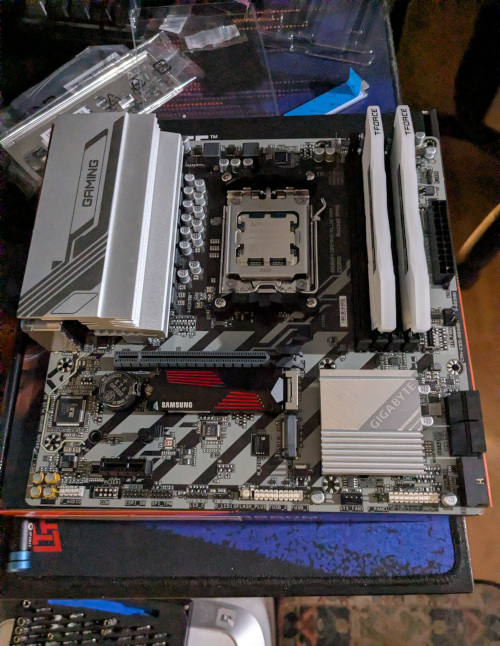
<p>So luckily, I just took a regular screw from my brother’s motherboard box that has them. And done. Then I put in RAM. And after that, here is some random image I took:</p>

<p><img src="https://joehuu.github.io/blog/assets/images/2025-12-18-thrills-of-pc-building/motherboard.jpg" alt="" /></p>

<p>Yes, I have a LTT desk pad and an iFixit Mako Driver Kit.</p>

<p>Then:</p>
<ul>
  <li>Put CPU cooler, check</li>
  <li>Temporarily remove rear motherboard fan, check</li>
  <li>Put motherboard I/O shield on case, check</li>
  <li>Put motherboard in case…</li>
</ul>

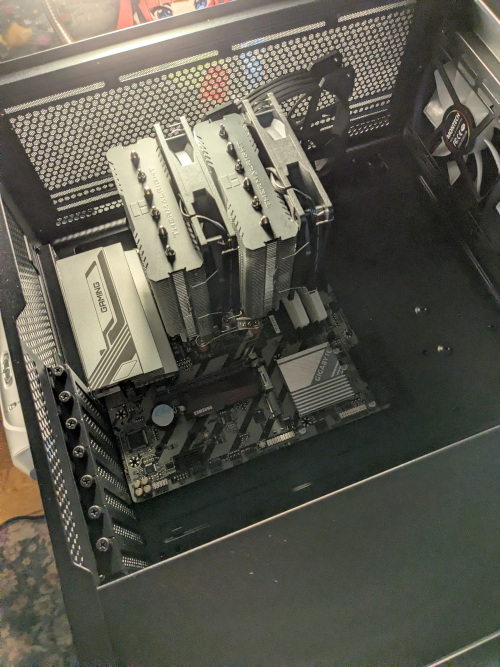
<p>One of the I/O shield ground tabs got wrongly bent, as seen in this <a href="https://youtu.be/_C6cVNnlJIk?t=123">recent video</a> I watched today, surprisingly, with the same board I guess. I was done building this on the 15th at night. I did fix it, with some hiccups. When I placed the motherboard for the first time, it got stuck. In the end, I just had to put some rightward pressure. The rest was easy, despite how messy the place looked with boxes open and plastic bags scattered everywhere.</p>

<p>Then another random image, which was before or after the I/O shield fix:</p>

<p><img src="https://joehuu.github.io/blog/assets/images/2025-12-18-thrills-of-pc-building/case.jpg" alt="" /></p>

<p>See the Nino plush. Anyway…</p>

<p>Then:</p>
<ul>
  <li>Put back rear motherboard fan</li>
  <li>Put GPU, check</li>
  <li>Put PSU, check</li>
  <li>Wire everything neatly, check</li>
</ul>

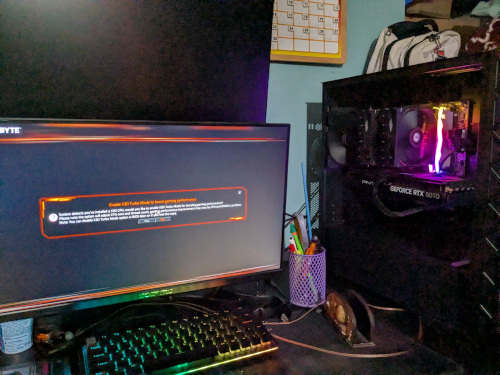
<p>Lastly, I just put the right metal panel back on (please don’t put the glass panel back yet) and hoped for a post:</p>

<p><img src="https://joehuu.github.io/blog/assets/images/2025-12-18-thrills-of-pc-building/post.jpg" alt="" /></p>

<p>It posted, but there are a few more issues at hand. Throughout the following days, I did some tests.</p>

<p>Here is a dump of them in no particular order:</p>
<ul>
  <li>bluetooth, check</li>
  <li>wifi, check (latest 6101.19.134.0 driver has intermittent connection issues, at least on Minecraft, use 6001.19.119.0 for now)</li>
  <li>gpu, check (latest 591.44 driver slows down system to a slideshow and can maybe recover after ~5 minutes, repro: alt-tabbing on Minecraft and waiting for a bit, use 581.80 for now) (may need more testing on other games for some tradeoff bug fixes or stuff)</li>
  <li>front I/O, check</li>
  <li>hardware and cooling, check (did stress tests: memtest86 (ram), furmark (gpu), cinebench and prime95 (cpu))</li>
  <li>firmware update on ssd, check (had some old known bugs)</li>
  <li>bios update, check (just because and when I was debugging the above)</li>
  <li>bios settings (expo 1 [for AMD CPU and seemingly the only setting that does 6000 Mhz], forcefully disable iGPU [auto doesn’t work, unnecessarily reserves ram for unused iGPU])</li>
</ul>

<p>I don’t really play games, so I just tested osu! and Minecraft. I use osu! to see if the performance and latency is similar to my current setup and Minecraft just because I was playing that at the time. Minecraft surprisingly shows two bugs that I’ve fixed via driver downgrades.</p>

<p>Well that’s it. See you next time. Or next year. Or next post, I guess.</p>]]></content><author><name>Joseph Madamba</name></author><category term="post" /><category term="diy" /><category term="computer" /><summary type="html"><![CDATA[It’s been a while. What happened? Well, not that much. I’m just really inconsistent with these things.]]></summary></entry><entry><title type="html">Coding and Perfectionism</title><link href="https://joehuu.github.io/blog/post/coding-and-perfectionism/" rel="alternate" type="text/html" title="Coding and Perfectionism" /><published>2023-10-24T05:30:00+00:00</published><updated>2023-10-24T05:30:00+00:00</updated><id>https://joehuu.github.io/blog/post/coding-and-perfectionism</id><content type="html" xml:base="https://joehuu.github.io/blog/post/coding-and-perfectionism/"><![CDATA[<p>When is software perfect? Never.</p>

<p>Is “Hello world” perfect? Maybe, but it’s so simple and not really useful. Comparing a game like osu!(lazer), this is about 1,000,000:1 if talking about lines of code.</p>

<ul>
  <li>Where do I put this class, method, or line?</li>
  <li>What do I name this?</li>
  <li>How do I structure this?</li>
  <li>Should it work like this?</li>
  <li>If I hack this now, would it be a problem in the future?</li>
</ul>

<p>It’s these questions like these that halt productivity. If working on a project that’s not yours, most of these questions can be found by looking for patterns in the codebase and conforming to them. But there can be firsts and no precedent. Maybe you want to annoy the lead of the project or find a solution yourself. The latter can make you seem like a competent contributor or get a “request changes” review / criticism for the solution.</p>

<p>The last question is whether you want to spend the time now or later. Say, for example, osu!(stable) is built on a couple of hacks and has survived to this day. Until the devs want to rewrite such a game. They have to support legacy systems, probably break a few really hacky parts, and add more features to keep the game interesting.</p>

<p>This is probably the reason why I have at least 10+ branches with changes that are not upstream. Most required a little hack or a hack that required a comment. I opened some PRs with such hacks and seemingly got merged. But when is it gonna be properly supported in the framework? When someone implements it I guess.</p>]]></content><author><name>Joseph Madamba</name></author><category term="post" /><category term="coding" /><summary type="html"><![CDATA[When is software perfect? Never.]]></summary></entry><entry><title type="html">Five Years of Open Source</title><link href="https://joehuu.github.io/blog/post/five-years-of-open-source/" rel="alternate" type="text/html" title="Five Years of Open Source" /><published>2023-02-15T07:50:00+00:00</published><updated>2023-02-17T07:25:00+00:00</updated><id>https://joehuu.github.io/blog/post/five-years-of-open-source</id><content type="html" xml:base="https://joehuu.github.io/blog/post/five-years-of-open-source/"><![CDATA[<p>Today marks five years since I contributed to open source. I mainly contributed to a rhythm game called osu!, so I will focus on that.</p>

<p>Let’s talk about dates before February 14. On GitHub, it said that I joined on January 10. But I was lurking a bit before that when I was following osu!(lazer) builds. I remembered watching <a href="https://www.youtube.com/watch?v=5x7VnC1R0Do">a video about the progress done at the end of 2017</a> when it came out. I, unfortunately, do not remember how or when I started following. Maybe it was that video, maybe not. I then joined the osu!dev Discord on February 12. Two days later I started contributing.</p>

<p>My first two contributions on this day five years ago were of course issues. They were on the game’s website: <a href="https://github.com/ppy/osu-web/issues/2403">ppy/osu-web#2403</a> and <a href="https://github.com/ppy/osu-web/issues/2404">ppy/osu-web#2404</a>. I was the nitpicky type on day one, who knew. The fixes were PRed by the maintainers like 5 hours later and were merged a day after. I said to myself, make more issues. I made a whopping 10 issues the next day and the day after that. I then received a Discord DM from a then-issue opener like me to stop spamming issues, and I seemed to limit myself from then on. Looking at old issues, I shouldn’t have used a temporary image service puush. Now most of my past issues have a blank void :(</p>

<p>I made my very first PR on the website about a week later. It was just string modifications. To this day, I haven’t made a working development environment with web, and I went on contributing to other projects osu! had in store after I couldn’t find any more issues on web. First was the game, and second, was the wiki.</p>

<p>The wiki was where I was contributing for 2018-2019. I was mostly reviewing (with nitpicks) and helped made a consistent formatting article of the markdown (known as the ASC). I stopped contributing as I felt I couldn’t do anything else / was inefficient with the manual process. Since I left, there have been automated tools and CI made by the current contributors.</p>

<p>Around the time I was on the wiki, I also contributed to the game at a lower rate. My first PR was a mess. I wasn’t even using an IDE. After I knew my mistakes, I fired up the really bloated Visual Studio at the time, and I had a slow computer at the time. I then switched to VSCode. I was increasingly contributing here. In 2020, or three years ago, I got a <a href="https://osu.ppy.sh/home/news/2020-02-07-community-contributors-2019">community contributor badge</a>. I believe I was done, but I just continued fixing the game as much as I can. I only recently switched to Rider in 2021. It was a huge jump to whatever I was using.</p>

<p>History aside, I gained a ton of experience. I didn’t code before this, but I had a yearning to fix things myself. I knew of osu! from a sibling and initially saw no interest. I was probably invested in some other game (Pokemon). I became interested when I played it more and noticed that it was open-source and needed some work. Working with the game you like really is something.</p>

<p>Thanks to everyone that helped me with this journey. Most notably, thank you peppy for making osu!, bdach for reviewing my pull requests, and MegaApplePi (if you’re still there) for making open-source initially less scary.</p>]]></content><author><name>Joseph Madamba</name></author><category term="post" /><category term="coding" /><category term="osu!" /><summary type="html"><![CDATA[Today marks five years since I contributed to open source. I mainly contributed to a rhythm game called osu!, so I will focus on that.]]></summary></entry></feed>